Monday, March 13, 2023

How to Create Viral-Worthy Social Media Posts

The holy grail of the digital age is producing social media content that goes viral. Every company, brand, and person want their content to be shared and liked by millions of people. However, what actually causes a social media post to go viral? Is it luck, or can it be planned and carried out?

The truth is that coming up with social media content that goes viral takes both chance and planning. But don’t let that get you down; there are some strategies you can use to improve your chances of producing content that is widely shared and appreciated.

Creating viral-worthy social media posts is not an exact science, but there are several strategies you can use to increase the likelihood that your content will go viral.

Here are some tips.

Know Your Audience

Understanding who your target audience is and what they are interested in is crucial to creating content that resonates with them. Research your audience’s demographics, interests, and online behavior to gain insights into what they like and how they interact with social media.

Listen to what your audience is saying on social media, and join in on the conversation. Follow relevant hashtags, keywords, or topics related to your industry to understand their needs, concerns, and opinions.

Use social media analytics metrics to learn which posts perform better and which demographics interact with your content the most.

Engaging with your audience directly is another way to better understand them. Survey them, ask them questions, and get their opinions. This will provide you with important insights into what your audience wants to see on social media from your brand.

Use Attention-Grabbing Headlines

Use short, catchy headlines that grab attention and create curiosity. Consider using humor, controversy, or emotion to get people’s attention. Here are a few writing tips:

  • Keep it short and sweet: Headlines should be short and to the point, ideally no longer than 10-12 words.
  • Use strong verbs: Use strong action words to create a sense of excitement and urgency. For example, “Discover,” “Uncover,” “Reveal,” “Revolutionize.”
  • Use numbers: Including numbers in your headlines can increase engagement by making your content feel more concrete and specific. For example, “10 ways to…” or “5 tips for…”
  •  Ask a question: Asking a question in your headline can encourage engagement by prompting the reader to think about their own experiences or opinions. For example, “Have you ever wondered…”
  • Use emotion: Using emotive language can create a sense of excitement, urgency, or curiosity. For example, “Don’t miss out on…”, “Amazing”, “Incredible”
  • Be specific: Use specific language that gives readers a clear idea of what they can expect from your content. For example, “How to…”, “The ultimate guide to…”, “Step-by-step tutorial…”

Create Visually Appealing Content

Social media is a visual platform, and creating visually appealing content is essential for grabbing attention. Use high-quality images that are clear and visually appealing. Avoid using blurry or low-quality images as they can negatively impact the overall aesthetic of your content.

Graphics, animations, and infographics to make your content more engaging and visually appealing. You can use tools such as Canva, Adobe Spark, or Piktochart to create graphics and infographics easily.

Videos are a highly engaging form of content and can help you grab your audience’s attention. Create short and informative videos to convey your message effectively.

Lastly, keep it simple. Keeping your designs clean, simple, and easy to understand will avoid cluttering your designs with too many elements or text which can make your content difficult to read and understand.

customer comments

Make It Shareable

Making your content easily sharable on social media can help increase its reach and engagement.

Adding social media sharing buttons to your website, blog, or other online platforms to make it easy for people to share your content. Use visually appealing graphics or videos that are easy to share on social media platforms. Make sure your graphics are optimized for each platform and include a clear call-to-action.

Keep your content short and to the point, making it easy for people to read and share quickly. Use short, snappy headlines and bullet points to break up your content into digestible chunks.

Encourage your followers to share your content by including social media sharing prompts at the end of your content. For example, “Share this post with your friends!” or “Don’t forget to tag us in your posts!”

Using relevant hashtags in your content will make it more discoverable on social media platforms. This can increase the chances of your content being shared and seen by a wider audience.

Don’t forget to make it mobile-friendly. Make sure your content is optimized for mobile devices, as a large portion of social media users access social media on their mobile devices.

Engagement is the Key

Engaging with your audience on social media is essential for building relationships, increasing brand awareness, and driving engagement.

Respond to comments and direct messages in a timely and personalized manner. This shows your audience that you value their input and care about their experiences with your brand.

Alternatively, you can ask questions to encourage engagement and start a conversation with your audience. This can help you gain insights into their interests and preferences.

You should also share user-generated content to show your appreciation for your audience and encourage them to engage with your brand. This can also help you showcase your products or services in an authentic way.

Create valuable and informative content that your audience will find useful and shareable. This can help you establish your brand as a thought leader and increase your credibility and authority in your industry.

Don’t forget to be authentic and human in your interactions with your audience. This builds trust and establishes a strong emotional connection with your followers.

Bottom Line

It takes a combination of knowing your audience, using attention grabbing headlines, visually appealing content, being sharable and engagement to produce social media content that goes viral. 

The most important thing to remember is to be original, direct, and opinionated.  Keep in mind that social media is constantly changing, so it’s critical to stay current with the most recent best practices. Continue experimenting with various content types, and don’t be shy about expressing your own voice and unique perspective.

The post How to Create Viral-Worthy Social Media Posts appeared first on Creativ Digital.


from Creativ Digital https://ift.tt/hV4yu06

Sunday, March 12, 2023

The Best Tiktok Ad Creatives

Do you want to know what content works best with TikTok ads? Need new, effective strategies that have been tested?

You’re in the right place because in this blog, we’re talking about how to create TikTok creatives that deliver results.

Using TikTok in Your Social Advertising Strategy

Different social networks are useful for various purposes. For long-term sales and audience building on Facebook, you can set campaigns and forget about them. You can experiment with various content on Instagram and engage with your followers.

TikTok ads are about speed and scale.

  • You can quickly reach a large audience with TikTok ads.
  • Comparable to other social networks, they offer cheaper and higher click-through rates.
  • As people learn about your brand on TikTok and then search for more information, your brand’s visibility and search traffic increase.
  • TikTok’s brand recognition may even increase Facebook and Google ad conversion rates.

But there are a few restrictions. Paid content on TikTok is only active for a maximum of two weeks. Following that, viewers become disinterested and the algorithm lowers its rating. TikTok also demands that content have a distinct look and feel. You cannot simply upload successful TikTok advertisements from Twitter or Instagram.

The big picture: TikTok advertisements are incredibly successful, but they should be used as a part of a mixed social strategy, with long-term support from advertisements on other social networks.

They differ from ads on other social networks in their layout, style, and duration. Before you begin developing TikTok advertising campaigns, consider the following.

Types of Tiktok Ads

On TikTok, there are two ways to make advertisements.

  • Use Spark ads to increase the reach of a successful organic post. The post may originate from your profile or that of another person (such as an influencer). All you require is the post’s spark ad ID code.
  • Upload content created specifically for ads using the Ads Manager. To do this, all you need is a business account; no active TikTok profile is required. If you don’t want to use the videos as spark ads, you can also re-upload them from your organic posts.

For now, our main priority will be producing content for the Ads Manager. The two approaches, however, are not that different. As we’ll see, the secret to successful TikTok advertising is to make it appear as natural as possible.

Live Streaming

How Long Do TikTok Ads Stay Effective?

Due to their brief shelf life, TikTok ads are practically unique.

That may or may not be a good thing. Because of their enormous reach and low prices, they more than make up for it. During that brief window of time, you’ll see a significant return on your advertising investment (ROAS).

But it is unquestionably brief. Ad content has a two-week shelf life. Even if your advertisement is extremely effective, the TikTok algorithm will eventually lower it. Your cost per metric will increase, and your ROAS will decrease.

This means that you’ll need to release fresh TikTok ad content every week. During that week, you’ll get the best ROAS; after that, switch to something else.

Types of TikTok Ad Creatives

What goes in a TikTok advertisment?

There is only one permanent rule: don’t make it look like an advertisment.

TikTok has a very strong community, which contributes to its popularity. Authentic, entertaining, and educational content thrives because of the community. According to studies, people who use TikTok to search for information tend to trust the app more than they do Google.

You must use creative that appears natural and TikTok-native in order to capitalize on that trust and enthusiasm and use TikTok for business. Here are the best examples.

Founder’s Origin Story Creative

Tell your best story—the origin of your brand—on TikTok because it loves stories.

What distinguishes you? How did you introduce your latest venture or product? What obstacles did you overcome?

Use jump cuts every 3-5 seconds and limit the length of the story to about one minute to keep viewers interested. Using images and video clips from your company, you can illustrate the story you are telling in the voiceover and captions. Re-enactments are acceptable if you don’t have any video from when you first opened your business.

Don’t forget to include a call to action at the conclusion that is pertinent to the narrative. Expressions like “be a part of our story” and “if you want to support us…” are very powerful.

For organic posts, this format works particularly well for eCommerce companies. Once the post has gained some popularity, you can re-upload the video to the TikTok Ads Manager or boost it as a spark ad.

The Let’s Compare Creative

The goal of this ad format is to stand out from the crowd. Due to TikTok’s love of split screens and comparisons, it receives high levels of organic engagement and can increase sales.

Limit the length of the video to 30 to 60 seconds. During that time, you will contrast your product with a rival’s by highlighting particular features. Pay attention to elements like cost, ingredients, environmental standing, and special features. Every point ought to last around three seconds.

Where possible, provide examples of the product in use to illustrate each point. For instance, you might open the product, smear some of it to show the color, and show how it appears after 12 hours of wear for a makeup comparison video. Make it hands-on and interactive!

Because using this video format to name your competition could have legal repercussions, some marketers are wary of doing so. To ensure that your video complies with the guidelines, it is always a good idea to review TikTok’s terms of service. Covering the label of your comparison product and referring to it generally is a straightforward way to allay concerns. You are not required to name-drop your rivals if you don’t want to.

The Interview Creative

This TikTok ad creative format is excellent for B2B, tech, and app companies. Making a strong case for your company in a brief video can be challenging. You can quickly cover a lot of important topics in an interview setting.

The interview should be around 60 seconds. That might seem brief, but keep in mind that TikTok videos tend to be short. Say hello, introduce yourself, and refrain from asking pointless questions. Get to the point quickly; you can add more details if you have time.

The interview questions can be used to discuss product features, offer advice, address frequently asked questions, and address common objections. Additionally, you can edit longer interviews, like podcasts.

You’ll need to switch between angles frequently, just like in a founder’s story video, to keep viewers interested. You could alternately cut between the interviewer’s and the interviewee’s faces, for instance. By switching between various camera angles, you can even conduct an interview with yourself!

People watch interview-style videos repeatedly because they want to review the details and get their questions answered. The TikTok algorithm will be happy to hear that. Start and end the video on the same shot to ensure a perfect loop if you want to enhance this effect even more. Without them even realizing it, people will begin to rewatch!

The Reaction Creative

Reaction videos are common on the platform. People immediately get hooked and interested

They can be utilized in your advertisements in a variety of ways, including:

  • Show how customers are interacting with a product in various circumstances. By filming in various locations, you can keep viewers’ interest while giving them a general idea of the brand and product.
  • Reactions can be combined with other video formats. For instance, you might record a brief interview clip in which one person responds to the other’s remarks.
  • Ask strangers or bystanders questions. The video will be riveting due to their emotional response. You could, for instance, ask passersby if they’re having a good or bad hair day if you sell hair products!
  • Display your response to the introduction or delivery of a new product. Tell your audience how excited you are.

Final Thoughts

You need to have organic and non-promotional type videos if you want to gain the trust and enthusiasm of TikTok users. Always remember to keep the videos short. Videos can be as long as 3 minutes, but it’s better to upload shorter ones. Good camera lighting can do wonders to how your video looks. Videos and products don’t need to be professionally produced or airbrushed. Focus on looking authentic instead.

The post The Best Tiktok Ad Creatives appeared first on Creativ Digital.


from Creativ Digital https://ift.tt/IE9Nly8

Thursday, March 9, 2023

Tips for Managing Multiple Social Media Accounts

Social media is a great way to build a following and connect with others. However, if you’re not careful, it can be difficult to manage multiple accounts. In this guide we’ll cover all the tips and tricks that will help you keep your social media accounts organized so that all of your content looks uniformed.

Use Software

If you have multiple social media accounts, you can use software to manage them all.

Take a look at some examples of account management tools below. Some of them have free trial that you can use to explore and find out which one suits your needs.

Secure Your Social Media Accounts

Securing your social media accounts is important to protect your personal information and prevent unauthorized access. Here are some tips to help you secure your social media accounts:

  • Use strong and unique passwords: Use a different password for each social media account and ensure that it is a strong and complex password with a combination of uppercase and lowercase letters, numbers, and symbols.
  • Enable two-factor authentication: Two-factor authentication is an added layer of security that requires a code sent to your phone or email to verify your identity when logging in. This ensures that only you can access your social media account.
  • Be cautious of phishing scams: Do not click on suspicious links or provide personal information to anyone claiming to be from the social media platform. Social media platforms will never ask for your password or personal information over email.
  • Adjust privacy settings: Review your social media privacy settings to ensure that your personal information and posts are only visible to those you trust.
  • Keep your software up-to-date: Ensure that your devices are running the latest operating system and software updates to avoid vulnerabilities that could be exploited by hackers.
  • Be mindful of what you share: Think twice before posting personal information or sensitive data such as financial information, home addresses, or phone numbers.

By following these tips, you can help protect your social media accounts and prevent unauthorized access.

Post at the Right Time

The right time to post social media updates varies depending on the platform and your target audience. Here are some general guidelines:

  • Facebook: The best time to post on Facebook is weekdays between 9am and 3pm, with the highest engagement on Wednesdays at 11am and 1pm.
  • Instagram: The best time to post on Instagram is weekdays between 10am and 3pm, with the highest engagement on Wednesdays at 11am and Fridays at 10-11am.
  • Twitter: The best time to post on Twitter is weekdays between 8am and 4pm, with the highest engagement on Wednesdays at 9am and Fridays at 9-10am.
  • LinkedIn: The best time to post on LinkedIn is weekdays between 10am and 12pm, with the highest engagement on Wednesdays at 9-10am and 12pm.

It’s important to note that these are just general guidelines and may not apply to all audiences. You should also consider the time zone of your target audience and test different posting times to see what works best for your specific audience. Additionally, you should focus on creating high-quality content that resonates with your audience and adds value to their lives, rather than just focusing on the time of day you post.

Take Time to Engage

customer comments

You might find it hard to make the time, but you must. Engaging with your followers is important because they’ll be more likely to interact with you if they feel like they’re being heard. Even if they don’t respond right away, it’s a good idea to keep engaging them anyway as part of your strategy for building relationships.

If people are responding to your posts, take the time to respond to their messages because this shows that you care. Use other communication channels such as email or SMS messages to ensure a better engagement strategy. Also, when it comes to emails, check out some phishing statistics so that your recipients are safe.

Curate, Repost and Repurpose Content

You won’t always have time to create new content across all your social media profiles. Curation is a good alterative and it’s not cheating. It can help you save time and keep your audience engaged while leveraging the audience of your competitors.

Check your competitors posts for something that is relevant. Then, share it on your account and offer your opinion. This is a good way to curate, repost, and repurpose content.

Unify Analytics

If you’re managing multiple social media accounts, it’s important to have a way to track your performance across all of them. You’ll want to collect data from each platform and make sure that you’re getting an accurate picture of what’s happening on various channels.

There are many tools available for this purpose: some will allow you to aggregate data from multiple platforms into one report, while others will let you create dashboards based on specific keywords or topics.

Unifying analytics mean that you don’t have to look at multiple tools to access metrics, save time and help you make better decisions.

Social Media Management Tools

There are many different tools available to help you manage your social media accounts effectively. Here are some examples:

  • Hootsuite – Hootsuite is a popular social media management platform that allows you to manage multiple social media accounts in one place. You can schedule posts, monitor mentions and engagement, and analyze your social media performance.
  • Buffer – Buffer is another social media management platform that offers similar features to Hootsuite. It also allows you to schedule posts, track analytics, and manage multiple accounts.
  • Sprout Social – Sprout Social is a more comprehensive social media management tool that includes features like social listening, customer engagement, and CRM integration.
  • Google Analytics – Google Analytics can help you track your social media traffic and understand how your social media channels are contributing to your website traffic and overall marketing goals.

Bottom Line

Overall, managing multiple social media accounts requires organization, consistency, and a focus on engagement and quality content. By implementing these strategies, you can effectively manage multiple social media accounts and build a strong online presence.

The post <strong>Tips for Managing Multiple Social Media Accounts</strong> appeared first on Creativ Digital.


from Creativ Digital https://ift.tt/Zc5SBtY

Wednesday, March 8, 2023

Does Social Media Have an Impact On Small Businesses?

Social media marketing has become a huge part of the business landscape, but it’s not just big companies that should be concerned about it. Small businesses are also looking at social media as an opportunity to connect with customers and drive revenue. As small businesses continue to grow and thrive, they need to make sure they are leveraging social media effectively in order to ensure their growth and success.

Let’s explore some ways that you can use social media marketing as a powerful tool for growing your small business.

Reach your customers anytime, anywhere

Social media is a great way to reach customers. You can reach your customers from anywhere, anytime and in any language. This means that you don’t have to physically be at the location of your business or in the same country as them. It also allows you to reach people who may not even know about your brand yet, but could be interested in what it has to offer based on their social media activity.

This is highly advantageous for small businesses with small marketing budgets since most social media platforms allow you to connect with others for free.

Low-Cost Marketing

Social media is a great way to reach customers, build your brand and reach new ones. It’s also a low-cost form of marketing.

It’s ideal for small businesses because it can be used as part of an overall strategy for growing your business.

Social media is an ideal low-cost marketing platform for businesses because of their potential to reach more clients without the need for payment. You can market your products for free and engage with customers which in itself is also a free form of marketing.

It’s a Free-Access Forum with a Potential to Boost Sales

Social media is a great way to reach your customers. It’s easy to use, so you can get started quickly. You can use it to promote your business or products and services, as well as brand awareness.

For example, a Florida company used Facebook ads for their new product line and saw an increase in sales after just one month’s worth of advertising costs were spent on the site alone. The company also had an effective strategy for getting more likes on their page by using contests that gave users something valuable in return for liking them back.

 This helped them gain more traction within the community while keeping costs down since they didn’t have any employees who needed salaries paid every month.  Since social media is easy to use and understand, many small business owners leverage the platform to reach more customers and boost sales without incurring more expenses which can help them boost profits.

Provides A Venue Where Customers Share Experience

Social media allows customers to share their experiences with your business. Customers can tell other customers about your business, which leads to word-of-mouth marketing for you. They also have the opportunity to share their experiences with you by posting reviews and photos on social media platforms like Instagram or Twitter.

This means that if someone has great experience with your product or service, they can easily voice it publicly on a public platform such as Facebook or Twitter. Others will know what happened and will be encouraged to try it.

Word-of-mouth marketing and testimonials are free marketing that you get from satisfied customers. They are free which allows you to keep advertising costs low.

It’s Easy to Implement, Monitor and Manage

Social media is easy to implement and manage. It’s also a no-brainer when it comes to monitoring, measuring, optimizing and scaling your social media efforts.

Social media platforms are all about content creation: you can post whatever you want on any platform that allows users to share content on platforms like Facebook or Twitter for example. You don’t need experience or any technical knowledge in order to create compelling posts that attract new customers.

However, if you are not familiar with social media platforms and how to leverage it as a marketing tool, there are free courses that you can look up on sites like YouTube. This is a good way to learn the basics and improve your knowledge and skills as you pick up experience.

Benefits of Social Media Marketing on Small Business

Social media marketing is a great way to increase brand awareness, promote content and drive traffic to your website. It’s also an easy way to stay one step ahead of your competition.

Social networks are a valuable communication for small businesses because they allow you to get closer to your customers. You can learn more about them, understand what they want and don’t want, and engage with them in ways that traditional media simply can’t do.

Bottom Line Social media is a powerful tool for small businesses. It gives you the opportunity to reach your customers at anytime, anywhere. You can use it as an easy-to-access forum where they can share experiences with each other and learn more about your brand. And if they enjoy what they see, they may decide to buy from you!

The post <strong>Does Social Media Have an Impact On Small Businesses?</strong> appeared first on Creativ Digital.


from Creativ Digital https://ift.tt/Y7Cflso

Monday, March 6, 2023

UX Design: Best Practices for Buttons

Nothing particularly ground-breaking here, am I right? Since the introduction of the <button> tag in HTML4, buttons haven’t been particularly challenging to make. Despite this, it’s relatively easy to find buttons that don’t adhere to the fundamental best practices, so in this blog we’re going to delve a little deeper into them.

Make Your Buttons Look Like Buttons

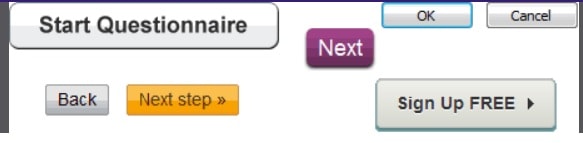
The key to buttons is that they must have a buttonlike appearance, with some shading on their surface or around their edges to distinguish them from the background and give them the appearance of being clickable.

Words by itself definitely doesn’t provide enough visual cues, nor does a shape around a word without any shading to make it look buttony.

A button may lose its button-like appearance if it is made too large. The photo displays a portion of the UK Web page where you can sign up to be an organ donor. It has four buttons: one for the primary action and three for the secondary actions. However, the primary action button is so big that it no longer resembles a button.

Despite the fact that it seems obvious to me that buttons should look like buttons, many website designers seem to be concerned that a sloppy old button would ruin the lovely lines of their design. Naturally, they could be right: we want that main action button to look fantastic in addition to looking like a button. Since it’s the only place your users will look, it needs to be visually appealing.

Put Buttons Where It’s Easy For Users To Spot Them

Is the OK button to the left or right of the Cancel button? It’s one of the most contentious issues in user experience. And there is also the issue of Next and Previous buttons. There are opinions everywhere, and they’re frequently supported by studies even actual research.

In our experience, there is usually just 2 buttons in a dialogue box or survey: OK and Cancel. Sometimes the buttons are Next and Previous in survey forms. This is usually preceded by a question or image. However, before users can proceed with an action button, what are they looking at? What will lead them to select Back or Cancel?

Generally speaking, when you’re on a web page, it’s all about knowing what catches your users’ attention which motivates them to take action. The image or text must inspire them to take action so that you know where to put the corresponding action button.

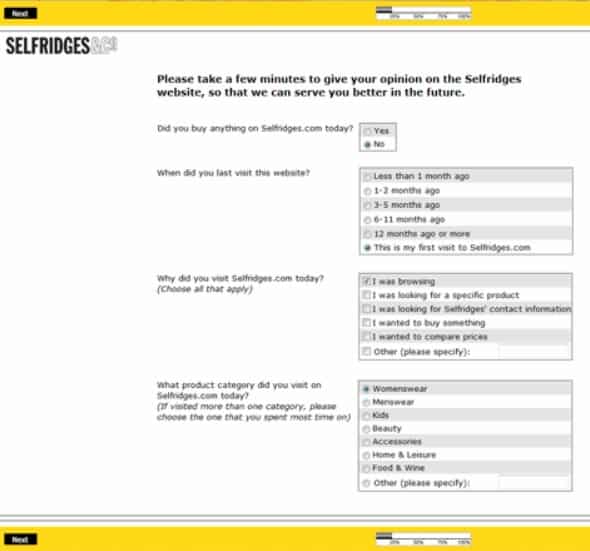
Put the primary action button, Next, OK, or Send, as close to the left-end of the final field on the form as you can because, in the world of forms and surveys, users have just tapped or clicked a field.

However, there are instances where CTA buttons are hidden. Take a look at this photo. There is an action button in the footer and another one hiding above the logo.

Make the Most Important Button Standout

Another strange technique for making it challenging for users to play “hunter-for-the-button-I-want” is to provide them with a lot of buttons arranged in a row that all look very similar.

Why not give users a bit of help and make the primary action button more prominent? It will appear more significant if it is made slightly larger. Additionally, it makes it easier for users to click on. Alternatively, use a more obvious color for the main action button—just don’t be too subdued. Our goal is to be obvious.

Put Buttons in a Logical Order

Where should the other buttons go if the main action button needs to be the first thing users look at?

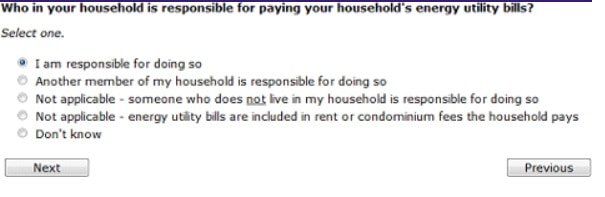
It goes without saying that you should hide the other buttons so users won’t accidentally press them. This is good advice, but if you abide by it without considering other design factors, it might result in undesirable layouts like the one in the photo below.

For languages that read left to right, a Previous button should always be to the left of a Next button, so the answer here is to rearrange the fields and buttons. Another option would be to increase the left margin of the page and put the Previous button into it.

Label Buttons With What They Do

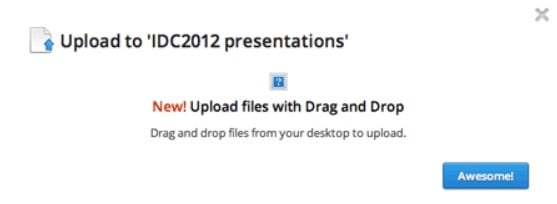
Sometimes we encounter buttons with strange labels. We can’t help but ask what they do. Take a look at the message on the photo after we uploaded a file. It provided me with just the Awesome button. What was the intended meaning of that? What effect had the button? How could I achieve my objective of making that presentation the best it could be?

This is an example of breaking the best practice to clearly label buttons with their functions.

If There is No Action Required, Then Don’t Put a Button for It

We have also encountered many forms with useless buttons. I try to fill them out honestly to see if they work, but I don’t really want to sign up for a website, apply for a loan, or do anything else that they might ask me to do, so I find a Reset or Cancel button rather handy.

We haven’t seen a Reset button on a form in a very long time, and even Cancel buttons are getting harder to find.

We also continue to see a lot of buttons that simply repeat the same action, so users get the feeling that they aren’t making any progress. For instance, I recently began the process of applying for a credit card. The primary action buttons from the first three steps are shown in the photo below. Since none of them offered me a form before I had even answered a single question, I quickly gave up on that process out of impatience.

Make It Hard to Find Destructive Buttons

Despite my arguments against providing users with buttons for actions they don’t want to take, there are times when we must provide harmful buttons, like Cancel This Order. This was one of the plausible Cancel buttons that I found in my library, from a Web site that is aimed at non-savvy users who were about to commit to a rather large purchase, with long-term monthly payments, and who might not realize that the Close the Window option would let them escape.

If you do need to include destructive buttons, you should definitely find a way to make them harder to find than the primary action button—for example, by making them look less buttony, smaller, or even turning them into links. Users who want to cancel or take other negative actions will split off and look for them. However, users who are happily working on their tasks are not caught in a terrible error.

Final Thoughts

A crucial part of these conversations is played by the modest button. A short form with a button that is immediately visible is good; a long form without a button above the fold might not be so good. When users first navigate to a page with a form, an appropriately easy-to-spot primary action button helps to show the extent of their task. Of course, the relationship—that is, the interaction between the objectives of the user and the evaluation of the entity posing the query—determines how this works.

The post UX Design: Best Practices for Buttons appeared first on Creativ Digital.


from Creativ Digital https://ift.tt/vCFTYyq

Sunday, March 5, 2023

Small Business: UX Design on a Budget

You may occasionally be asked to create excellent UX design on a tight budget, especially if you work for a smaller company. Although it may seem as though you are being asked to do the impossible, there are a few guidelines that can help you avoid a glaring dead end and guarantee you get the best possible UX design.

There is no getting around the fact that a great product requires great UX design. However, small businesses frequently lack the resources to provide a great experience. Small businesses typically have simpler navigation, content, and audience segments, as well as easier-to-reduce objectives because brand recognition and traffic volume are lower.

In many instances, the difference between the cost of UX and the return on investment as a percentage increase in sales is negligible. UX incrementally improves performance. When traffic is high, this generates a lot of revenue with small percentage increases, but when traffic drops to less than 5,000 visits per month, the numbers for small businesses simply don’t add up.

What can UX designers do as a result? The solution, to use a cliched but apt business phrase, is to grab the low-hanging fruit. Here are strategies to help you succeed with UX design on a tight budget. The best web design tools or the best UI prototyping tools might be what you’re looking for.

Learn from Your Big Competitors

Do some research on competitors and major corporations in your client’s industry to see how they operate because big businesses frequently invest a lot of money in user experience. Choose five and compare them to the competition to get a good idea of the dos and don’ts. Online reviews for these well-known brands frequently contain gold.

You can compare competitors’ websites over time using comparison tools offered by some of the best SEO tools. You could even do the research and check out past versions of their websites on the Internet Archive to see how they have changed.

Improve UX Design Knowledge and Experience

There is no quick fix, but if you don’t already have a solid understanding of UX design theory, it’s time to start learning. This is especially true if you want to design UX for your own product but lack the funds to hire a qualified UX designer.

This is a great way to start out crushing UX design on a budget. Once you have the foundation, you should try to gain experience wherever you can, like by working as a UX professional’s shadow.

Create Mockups

Mockups can be used for a variety of UX tasks and are a crucial step in determining how users will interact with a website or app. With a pencil and paper, you can brainstorm and sketch out various elements to produce a very functional site map, page map, actions, content structure, and user flow, such as which pages are required, what your client’s goals are, and what customers are looking for. There are also a wide variety of tools available that you can use to make mockups.

Use Google Analytics

We can use Google Analytics to collect data about their behavior, whereabouts, devices, user flow, and actions without having to speak to our customers. There are many ways you can use this to enhance your user experience. You can identify the point at which users are abandoning an action or purchase, for instance. If this occurs midway through, what is deterring them?

The content strategy for your client can be shaped even by knowing which blog posts receive the most traffic. You can get site analytics from many of the top web hosting companies.

Use Heatmaps

It would be nice if UX designers could watch people using their app or website that they are designing. Ideally, this would be in a situation where they actually use it on a normal setting in order to get objective and realistic results. Alternatively, roping in your friend would be doing it on a budget.

Heatmaps are a great alternative, though, if you can’t watch someone use your site. You can add a tracking code for free on websites like Smartlook to collect crucial data on user behavior. Just be sure to include them in the cookie policy for the website.

Ask Existing Customers

Why not ask these contacts for feedback if most businesses, even if their numbers are relatively small, you will have a mailing list or database of customers or leads? Instead of just giving yes/no answers, formulate five straightforward questions that will spark conversation. Consider carefully what will help you gain the most understanding of the issues you are attempting to solve.

Offering a reward is one way to get more responses; for instance, those who respond could be entered into a drawing for prizes. In the process, you build goodwill and get insightful feedback from actual users. You can make use of a tool like Survey Monkey to analyze the results of your respondents’ answers.

Learn How to Boost Conversions

The ultimate objective for the business will almost certainly be some sort of conversion if you’re designing UX for a website. It’s important to learn some specific techniques, but good UX can also increase conversion chances.

A UX designer should have powerful tools like multivariate tests (MVT), conversion rate optimization (CRO), and A/B testing in their toolbox. The results won’t be conclusive if you don’t have the traffic, but there are still benefits to be had by taking note of the aforementioned strategies and making small adjustments.

Check First Impressions

Even if you’re still in the design stage, you can still conduct tests. UseabilityHub’s Five Second Tests are a great little tool to get a snapshot of what people think upon their first glance at the site.

As we mentioned, if your website doesn’t have a lot of traffic, the results of such conversion testing won’t be conclusive. You can elicit users’ first impressions by asking a few quick questions. Self-recruited tests up to two minutes in length are offered without charge.

The post Small Business: UX Design on a Budget appeared first on Creativ Digital.


from Creativ Digital https://ift.tt/JAhmBLI

Thursday, March 2, 2023

Benefits of Good UX Design in Fintech

Experience is everything nowadays. Companies of all sizes and shapes, from cutting-edge tech startups to well-known household names, are starting to understand how crucial it is to offer exceptional customer service.

To accomplish this, they must, however, make sure that their UX and UI are top-notch. The ultimate objective is to develop a pleasurable, frictionless, omni-channel experience that does not only assist users in finding what they are looking for but also entices them to return in the future.

This article will examine the top UI/UX trends for fintech that you need to be aware of and evaluate how they might affect your brand, customers and your profitability.

Improves Customer Experience (CX)

Your customers will enjoy using your products and services if you create a frictionless experience centered around an intuitive, simple-to-use product architecture—combined with a user-friendly layout and design.

This is not shocking. Poor UX and UI design on the other hand can drive customers away. Did you know that 90% of users have abandoned an app due to poor usability? Whether you develop enterprise collections management software or smartphones, CX is king.

Improves Bottom Line

Offering excellent CX (based on UX and UI design) is one thing, but it does not mean anything unless you can clearly see how it affects your bottom line. Fortunately, spending money on UX and UI might just be the most effective move you can make to increase your profitability. According to research, just $1 spent on UX yields $100 in return at an ROI of 9,900%.

How did this happen? To begin with, UX and UI can significantly impact your conversion rate. According to Forbes, “a well-designed user interface could raise the conversion rate on your website by up to 200%, and a better UX design could yield conversion rates as high as 400%.

That’s not all. You’ll be able to raise your prices because, 80% of consumers would pay more for a better customer experience based on research. You’ll also convert more prospective customers.

Makes You Different from Competitors

Your brand can gain an advantage over rivals by having a strong UX and UI. An increased emphasis on UX and UI is largely responsible for the rise of Fintech in recent years. Personal finance and banking are complicated. Brands that assist customers in sifting through the clutter will succeed in the market.

The key to standing out is to design enjoyable, memorable experiences. This is now an essential feature. It’s a must-have.

Makes Your Brand Trustworthy

A good user experience design will help you build trust with your customers. People are more likely to use a brand that they perceive as trustworthy, so it’s important for fintech companies to make sure they’re not only creating an amazing product but also ensuring that the people who use it have a positive experience.

Younger generations are becoming more reliant on established tech giants like Google and Apple, which prioritize UX and UI design in all aspects of their operations. If digital banking products from Google or Apple were ever made available to the public, 56% of consumers under the age of thirty said they would choose to use them.

First impressions matter. Brands that are visually appealing and have an engaging UX will keep customers’ attention longer and gain their trust over time.

Turns Delicate Processes into Enjoyable Experiences

Consumers’ feelings of embarrassment, uncertainty about their options, or annoyance that their sense of urgency has been violated (a concept known as “reactance”) have historically made the dunning process extremely difficult.

However, this does not have to be the case. The best enterprise collections management software reimagines the repayment process through UX and UI. Customers can quickly determine how much they owe, create a repayment plan, and make payments as they are able. Rather than subjecting them to complicated (and ostensibly intimidating) terms, they are invited to participate in an ongoing conversation.

According to survey a user’s first impression of your product is related to design. First impression is important because unimpressed users are often linked to unforgiveness. UI/UX design must be perfectly aligned with user’s needs followed by flawless implementation. This results in stunning UI and UX.

Consider the necessity of using mobile-first design principles, as 74% of users say they are more likely to visit a website that has been properly optimized for mobile. The younger generations are becoming more and more concerned with this.

According to Chase, 98% of Millennials and 99% of Gen Z use mobile banking. However, it’s evident that having a good UX and UI is essential to ensuring consumers use these tools to their fullest potential given that 38% of users claim to abandon mobile banking activities if they take too long

Another strong UX trend that doesn’t appear to be going away anytime soon is personalization. This is not surprising given that 72% of consumers only interact with personalized messaging.

Or how about adding animated storytelling that is scroll-triggered to your offering? Users can learn all about the various ways to pay back their debt as they scroll down thanks to animated illustrations that make the pages inviting to read, interesting, and memorable.

Large blocks of text don’t look good. Even with the best content in the world, it will fail if it is presented in an unpleasant way. Consumers in the twenty-first century have been trained to trust companies that excel at user experience and user interface design (think of Netflix, Spotify, or Facebook). As a result, businesses that provide customers with enjoyable experiences gain their trust and loyalty.

However, it goes beyond just your customers. For instance, if you run a financial institution, you must implement tools that are simple to use. Even if your customers like these tools, they won’t have the desired impact if you make it difficult for your staff to use them.

Final Thoughts

Enterprise software can no longer hide behind the claim that it is “feature-rich but usability poor”. Usability, fueled by UX and UI design, will be crucial in the coming years. When it comes to the complicated world of personal finances, this is especially important. Your financial institution will stand out from the competition, gain long-term customer trust, and fuel long-term success by partnering with an enterprise software provider that prioritizes UX and UI.

The post Benefits of Good UX Design in Fintech appeared first on Creativ Digital.


from Creativ Digital https://ift.tt/P4mgcdB