Friday, March 29, 2019

Wednesday, March 27, 2019
Overlooked Mobile Design Practices You Need To Implement
According to statistics provided by WeAreSocial.com 93% of internet users access the web through their phones. This means that your website can be seen by up to 3.5 billion people on their phones or tablet at any given time. This means that you should be working hard to optimize your online presence.
In this connection we would like to show you mobile design practices that are often overlooked but you need to be following. They will help streamline your visitor’s experience while maximizing your impact online.
Say Good-bye To NavBar
Real estate on a mobile device is at a premium. Every pixel costs money and a NavBar can eat away precious space. This means that you need to maximize every pixel and one way to do this is to do away with the NavBar.
NavBars on a desktop or laptop are very useful because they help visitors browse your website more easily. However, it can take up a ton of space on a mobile device which could have been put to use for images or content.
Now you might be asking how customers or guests are going to navigate. One of the ways to do this is by incorporating a hamburger menu. This type of navigation system allows users to pull out the menu like a drawer from the left side of the screen and show you items in the NavBar.
Important Elements Should Be Within Reach
How do you use your smartphone?
We use our phones all the time; while sitting on the bus, waiting in line at a Starbucks or while reading this article right now. How do you hold your phone? If you’re like most people you probably use your phone with one hand and use your thumb to navigate and browse.

According to mobile UX expert Steve Hoober, 75% of people use their thumbs to interact on their phones.
Screens of mobile phones got bigger but our thumb size have remained the same. Therefore it is important to remember to keep key elements within thumb reach. Designers should organize content that puts primary interactions front and center with secondary and tertiary options at the top and bottom of the screen respectively.
Optimize and Minimize File Size
File sizes drastically impact load time as it directly affects user experience and search rankings. This is even more important on smartphones because connections aren’t always reliable. Visitors aren’t likely to wait if your website loads slowly so it’s important to minimize file size of images before uploading them to your website.
Sites and tools like TinyJPG, ImageOptim and Export for Web can help you minimize image size before uploading them onto the web.
Link Phone Numbers and Addresses
Mobile users want a streamlined experience so your web pages should be easy to access. This means that you should take advantage of interactions that make visiting your website a pleasant experience.
If you’re website sells products or if a phone number is an important touch point, one of the best things you can do is to make it easy for customers to call you. One of the best ways to make a contact us page valuable is to make phone numbers clickable. Please don’t make customers swipe back and forth across phone and browser apps to type in your number.
Making a phone number (and other important elements) clickable can make a big difference and all you need to do is to link it.
The same is true with your address. Customers who want to find you on Google Maps should be able to click your address without needing to copy-paste it on a browser. Little things like this can make customers feel in tune with your website and save them from doing extra work.
Disable Popups
Did you know that Google has a soft penalty for what they call “intrusive interstitials”?
This is what we laymen call popups and they can detract user experience because users are unable to see content they’ve clicked on. To stop this, Google has penalized websites with popups by downgrading their search rankings to discourage people from adding popups on their sites.
Just turn your popups off. If your popup is important just add as content in a section to stop Google from punishing you.
Optimize Forms For Mobile
We all k now that answering forms on a mobile device can be very hard. While typing has drastically improved since the days of T9, it’s still not perfect and therefore frustrating to many. Long forms require a lot of typing but typing takes a lot of effort. Therefore, do away with long forms for mobile devices.
One way to do this is by reducing the number of form fields users need to fill up. Take a look at this example:
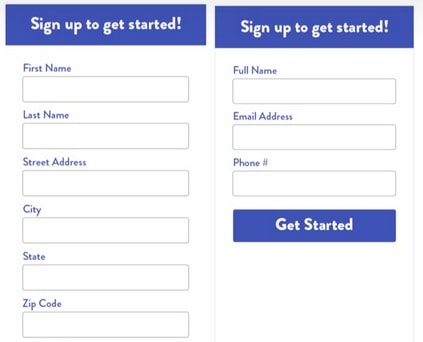
Another way is to break up the process into multiple steps. So if you have 9 fields put up 3 for the first step and after answering the form they are taken to the next page to fill up and so on.
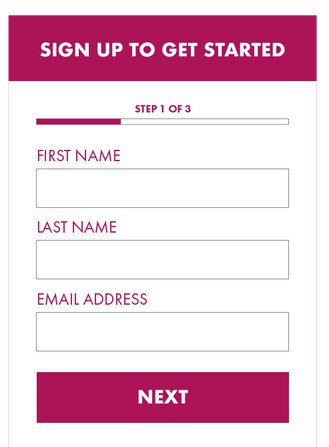
These options makes converting on your form less intimidating while allowing you to collect lead information in small bits from your users. Always remember the easier to fill up the better so at minimum collect their email address so you can market to them in the future.
Use Collapsible Sections or Accordions
Content on a mobile device usually gets compressed into 1 column that makes it look longer. This is a big issue for mobile users because it’s going to be harder for them to find what they’re looking for.
An elegant solution for this problem is to use collapsible content sections, a.k.a accordions. These are essentially containers that hold content and only shows up as a header unless the user taps on them. This allows guests to skim through content without having to shift through tons of images and other information.
We hope that these design tips will make it easier for you to streamline user experience for your mobile website. These practices are often overlooked which can lead to a drop in sales and ranking. Following these tips will improve user experience and make it easier for you to convert.
The post Overlooked Mobile Design Practices You Need To Implement appeared first on .
from https://ift.tt/2CD6Iq0
Tips For Better Sound Quality For YouTube Videos
YouTube videos have the potential to reach millions of viewers around the world. Aside from this, it can also help you become more popular. Because millions will be watching your video, picture and sound need to be good quality.
Here are some easy ways you can optimize sound for better audience impact.
Use Good Quality Microphone
One of the factors that decide sound quality for your YouTube video is how the sound is recorded. PCs and laptops with built-in microphones are convenient to use but they can also pick up the sound in the entire room you’re recording in. this can lead to reduced quality in the music or voice meant to be recorded due to background noise.
To avoid this you need to use an external microphone that can give you higher quality sound. This is because external microphones can be placed nearer to the source of the sound to ensure that unnecessary noise is reduced. To record individual voices, lapel clip microphones are good choices. There are many good quality microphones that can be bought in electronic stores so make sure to choose a good brand.
Learn About Supported File Formats
Did you know that there are certain file formats that are most compatible with YouTube?
This means to say that YouTube operates best using these formats. While YouTube supports different formats there is a risk of the final product having reduced quality and issues could crop up.
YouTube has stated before that MP4 is the best format for uploading because it has better quality than FLV and not as heavy as AVI. WMV HDD sometimes loses its quality while 3GPP and MPEG-PS resolutions are too small.
Don’t Edit Excessively
Many people think that the more you edit the better. This is wrong because excessive editing can take a toll on the quality of sound especially if you’re adding effects.
YouTube recommends having the best audio possible. Video files should have maximum similarity to the original quality. While usage of the original video is not always possible, you can always reduce the amount of damage you can make by ensuring that the audio track is as long as the video track. This means that the two tracks should stop and end at the same time stamp. Keep in mind that issues can crop up if the two tracks differ even by just a few seconds.
Choose Best Quality Export Settings
Uploaded videos should be optimized for streaming. To do this, YouTube videos to a file format and size that will operate well with their internal system. One of the drawbacks to this is that large video files tend to get compressed during the process which leads to poor quality.
If you want the best audio for your video, follow YouTube’s recommendation for exporting files. The option provided should say that it will be able to maintain original size and format while uploading. If you want to keep quality intact don’t opt for a smaller size.
Many video editing programs support room for various file formats during the export procedure. It’s best to go for superior quality settings rather than exporting the video for email or the web.
Keep in mind that you want people not only to understand you but you also want to give them a good user experience. If you want to reach more people and provide valuable content make sure that your YouTube video has both good picture and audio quality.
The post Tips For Better Sound Quality For YouTube Videos appeared first on .
from https://ift.tt/2FuMUFU
Friday, March 22, 2019
8 Ways to Transform Your Blog Readers into Potential Leads
You are most likely already using blogs to make yourself visible online on different social media platforms and search engines. The importance of blogging is second to social media and email. According to the 2018 data report published by the Content Marketing Institute, 79% of B2B marketers and 70% of B2C marketers have blogs.
You are generating a large quantity of valuable traffic from blogs. But are you successfully converting your traffic to leads?
If not, it is high time for you to know how you can quickly change the audience visiting your blog into potential leads.
Turn your blog traffic into leads using these eight strategies.
1. Offer solution through blog posts
Fantastic and high-quality articles are an excellent way to increase traffic to your blog. But to turn your visitors into leads, you need to provide content that addresses their concerns and issues.
When an audience is surfing the web for a solution, then they are most likely in a state to buy. Offering solutions in your blog post help to grab this category of users.
Do not provide all the solutions and answers in your blog!!
Strategically use this situation to make your visitors turn to leads. Give detailed solutions and answers through purchase, signing up or any means that suits your business.
One questions that might surface is how do you find the topic for your content.
Look through these approaches for generating subject for lead creating content.
A. Communicate with people. Start polls, raise questions on social media, send surveys to your customers and talk to your support team to know what topics are of concern.
B. It is always important to keep a close look at your competitors. See what they are up to. You will very often even come across ideas that might have escaped your mind.
C. Always keep a keen look over your Social Media accounts. Regularly check which conversations are drawing the most attention. Have a look at Google Trends to find trending topics.
D. Surf through the different Q&A sites. Websites like Quora are great places to find what people are asking or facing the problem. You can choose your blog content to be something that answers that question.
2. Smart CTAs to turn readers into leads
After populating your blogs with traffic, your main concern is how to convert this traffic into a lead. You need to divert these readers to your landing page. Call-To-Action (CTA) buttons are one of the most efficient ways to compel your audience to take action.
But, you need to use CTAs smartly to achieve your goal. You always need to keep your reader and clients in your mind when putting CTAs. Choose the one that best fits your niche. You can also try linking the text of your content to your desired landing page.
Most readers won’t simply click your call-to-action buttons. They need to be pushed to do so. For this, you have to have appealing text upon your buttons. Say, you want people to join for free. Then, you can go with the version “Join Free for a Month”. If you want them to download an eBook, then ask with the text “Download FREE eBook”. It is more appealing and bound to bring more leads. Make sure that your CTAs are visible.
3. Remarketing: Target your visitors
Remarketing or retargeting your audience is a proven tactic of grabbing more leads form your blogs. Whenever a visitor comes and visits your site and leaves with or without any purchase; attach a small code called pixel to keep track of them. Use tools like Google AdWords, ReTargeter, AdRoll, Perfect Audience or PixelMe for retargeting. What they do is provide ads to your sites on the pages they are browsing which can act as a potential lead generator.
4. Content Creation: Analyse the buying cycle
For your blog content to persuade people, first you need to target which stage of the buying cycle your readers are at. You can divide the buying cycle into four phases.
A. Necessity:
Need is something that we continuously have, but not always sure what the need is for. It can be the need for painting your house or the need for a new television.
B. Primary Survey:
Feeling the need for the next step that customers take is search online for possible solutions to their problem. After researching and going through the offers available, a client finds one that best suits them.
C. The Road to Purchase:
After a customer has already chosen what he needs and where to purchase it from, their next step will be to find the purchase procedure.
D. Purchase:
The final step is to purchase the product following the appropriate procedure.
When you are creating blog content, your focus should be on the second stage where people are looking for solutions. Provide valid and informational content which will provide a customer with the answers they are looking for. If a reader finds your content useful, they are more likely to turn into potential leads.
5. Monetise on emotions
Emotions are mostly responsible for moulding our decisions. We tend to follow what our mind tells us and based on that take the final decision. If you are smart, you will be taking this factor into account when creating your content. Some ways to dictate customers’ emotion are –
A. Stimulate Positivity:
When do you consider buying something? The answer is when it invokes a positive feeling inside of you.
B. Build a positive relationship:
If your customer trusts you and has a good relationship with you; then they are more likely to consider you for providing service.
C. Reassure your customers:
Assure your customers that they are making the right choice. A great way to do that is to offer a 100% money back guarantee.
6. Organise a webinar
One way to bring in more leads is to make it more engaging. Incorporate voice into your content. Webinars can be the perfect way to do so. Discuss and demonstrate a new product or services. Include forms and questions into it to get the maximum amount of leads.
7. Persuasive: Convince and build trust
Readers will become your buyers only if they trust you. You have to establish this trust through your blog content. People are reluctant to hand over their personal information. Your job is to create an atmosphere where they are comfortable. Your ultimate goal would be to persuade and convince them to buy or choose your service.
Dr Robert Cialdini in his book “Influence: The Psychology of Persuasion” has come up with six tactics that can be used to persuade your audience.
A. Reciprocation
Reciprocation dictates that if one person does you a favour, then you are to return the favour with kindness. The same concept applies to your blog. If you provide high quality and informational blog to your readers on a regular interval. Then at one point, they would be willing to share their email address with you to get updates of your recent activity. Also, it would build up trust.
B. Be Committed and Consistent
Commitment and Consistency can act as a silent weapon influencing people. You can start by being committed to publish more articles and stick to your word. Seeing your commitment will give rise to the audience’s faith in you. Also, remember to be consistent in your service of providing valuable contents. Seeing such commitment, your readers are more likely to agree to share their name and contact details.
C. Social Proof
Whenever a user searches for information or service online, then the first search its authenticity. Your presence in Social Media as Facebook, Twitter, Instagram, LinkedIn and others demonstrates that you are genuine. Also, how many people know about you and their reviews and testimonials serves the purpose of building their trust in you.
Be sure to put your reviews and testimonials in plain sight. It will act as a catalyst in convincing new visitors to sign on, choose your service or purchase your product.
D. Liking
Most people are likely to say yes to someone they know and like. So, be that person everyone trusts and likes. Be approachable always emitting a friendly, helpful, entertaining, positive, engaging and relatable aura.
E. Authority
To persuade people to join you, you need to become an authoritative figure in your niche. Be active and engage in different social Medias answering people’s question and display your knowledge.
F. Scarcity
Create scarcity to entice people into joining up or buying your product. Amazon has used these tactics to increase their sales. But, don’t overuse this strategy or people might feel manipulated.
8. Urgency through Creating FOMO
Introducing urgency will make your visitors more inclined to becoming leads just as when a sale goes on for a short time. Build up the importance of buying your product as soon as possible by providing data and examples in your blog.
Position yourself ahead of the game and make use of these simple tactics to convert traffic from your blog to nurtured leads. Turn your active blog which previously was used only to spread business knowledge into a monetisable tool.
The post 8 Ways to Transform Your Blog Readers into Potential Leads appeared first on .
from https://ift.tt/2Optbvm
Best Email Marketing Services For Small Businesses
Is email marketing a big part of your business? Are you struggling to find the best email service out there? Businesses in Australia need email marketing just like other businesses around the world.
According to studies conducted by Australian companies, email marketing has an average of 20.89% open rate, 6.46% click rate and received $22.78 ROI for every $1 spent on email. Result of the study also found that companies that invested 20% more of their marketing budget on email marketing are 8 times more likely to see their sales soar by 50% or more.
This means that you need to find a good email marketing service that enables you to create high quality emails. It also should have features such as contact management, user group segmentation ad performance tracking so that it is an efficient and effective marketing tool.
Having said that, let’s take a look at some of the best email marketing services for small businesses.
Constant Contact
Constant Contact is one of the biggest email marketing services in the world. They are also user-friendly and beginner friendly. Users will find it easy to manage email lists, contacts, marketing templates, calendars and more. Account holders can access tracking, reporting, social media sharing tools, image library, Facebook ads, integration, list segregation and a powerful e-commerce integration for Shopify users.
Subscribing to their Plus accounts will let you access more features such as email automation, surveys, polls, A/B testing and other tools to maximize your open rate.
Constant Contact also has excellent customer service with live chat, phone calls and email community support.
They have a free 60-day trial and after that services start at around $20 per month.
Drip
Drip is a good choice for eCommerce, bloggers, and marketers because they offer a wide range of tools to for marketing automation and personalization.
Drip can be integrated into popular platform builders including WordPress and WooCommerce. This allows for easy addition of sign up forms for leads.
What sets Drip above from other email marketing services is their intelligent marketing tools smarter email segmenting, list groups, and a visual workflow builder which allows you to reach your target market in your email list easier for more sales.
They also offer excellent support such as chat support, webinars, automation training, detailed courses, free guides and excellent documentation.
Drip is free for up to 100 subscribers and paid plans start at $49 per month.
SendInBlue

If you’re looking for an SMS and email marketing software for businesses, SendInBlue is a good choice. It’s a user friendly platform that features a lot of tools to create highly engaging emails. The tools are drag and drop so they are easy to use for people with no experience with email marketing.
You can use these beginner friendly tools to create transactional emails, create workflows, and segment users. You can also use their AI algorithms to find out the best time to send marketing emails.
SendInBlue allows you to send up to 300 emails per day but they will have the company’s branding. Paid plans start at $25 monthly.
Convert Kit
Convert Kit is easy to use and powerful making it a good choice for professional bloggers, authors, and marketers. It allows you to offer content upgrades and incentives with email sign ups. It also comes with auto responders to help you send drip emails.
Convert Kit makes it easy to segment contacts into those who are interested and those that already purchased. This helps to increase conversion rates with automated emails that feel personal. Their features are specifically designed for creators and professional bloggers.
This service is free for 14 days with pricing starting at $29 per month.
AWeber
AWeber is one of the oldest and most popular email marketing services. It offers a wide range of tools for small to medium-sized businesses. AWeber integrates to most services including WordPress. Subscribers can access email templates, list management, autoresponders, and email tracking with detailed insights.
AWeber offers a free trial for 30 days and plans start at $19 per month.
GetResponse
GetResponse has simplified email marketing for beginners and small businesses. It features a drag and drop builder that you can use to create campaigns, segment contacts and send content designed for specific groups. These automated campaign tools allows you to create effective campaigns and boost profits.
GetRepsonse comes with responsive forms, landing pages, A/B testing, tracking, and auto responders. It also integrates with third party lead generation software.
This service has a 30-day free trial with paid plans starting at $15 per month.
MailChimp

MailChimp is one of the most popular email marketing services because they offer a forever free email marketing service plan. This service can be integrated with WordPress, Magento, Shopify, and many other platforms and comes with email builder, auto responders, segmenting contacts into groups, and simple tracking for analytics.
Their forever free plan allows you to send 12,000 emails for up to 2,000 subscribers. However, it is limited because you can’t enjoy features like send-time optimization, advanced segmentation, multi-variate testing, etc. Furthermore, you are required to use their branding for all emails you send. Paid plans start at $10/month for up to 500 subscribers.
Choosing the right email marketing service can have a big impact on your marketing campaign. The best service offers amazing features and good ROI. Most importantly good services ensure that your emails don’t end up in the spam folder.
The post Best Email Marketing Services For Small Businesses appeared first on .
from https://ift.tt/2UPxja8
Magento Extensions For Online Business Success
Magento is one of the best options for stores that want to take their business online. Since it first came to existence in 2007, Magento’s market share has become one of the largest in the e-commerce space. According to a study conducted by AheadWorks, Magento market share has ballooned to 29.8% among the most popular e-commerce platforms.
Magento is popular because it is built on an open share technology with a robust shopping cart system, flexibility over content and amazing performance. Magento uses extensions so that online stores can have enhanced functionalities including marketing tools, SEO and catalog management. However, Magento has over 1,000 extensions available so looking for the best can take time.
Luckily we have a short list of recommendations for Magento users. Here are some of the best we’ve found.
DotMailer

DotMailer is a marketing tool that can be used to create seamless email marketing campaigns. It is the platform of choice for businesses looking to engage customers at all touch points. Users can connect customer data, surface powerful insights, and automate intelligent messages across email, SMS, social, and more.
It features a drag and drop editor, analytics, list management, online surveys, marketing automation, triggered campaigns and behavioral profiling. This is a good extension for businesses looking to outperform your past marketing campaigns.
Fire Checkout 2.X
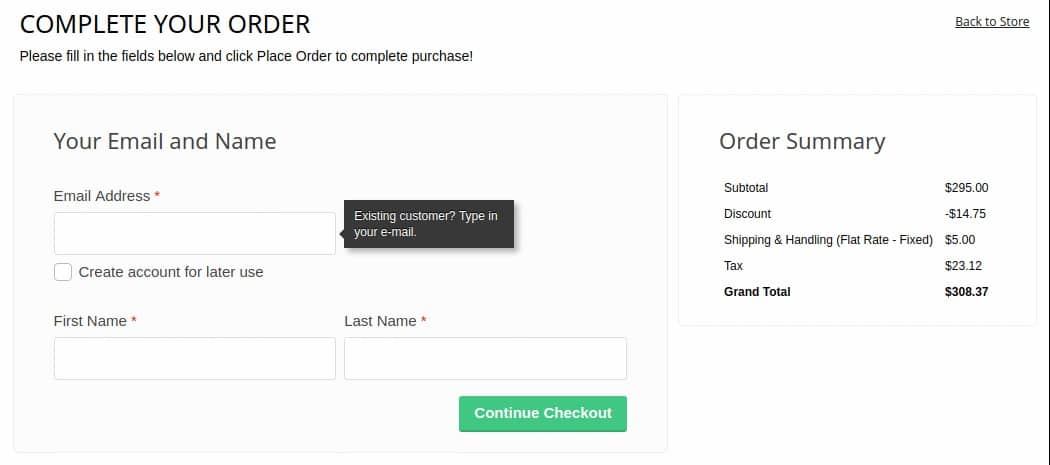
One of the best ways to improve user experience in an online store is to provide seamless checkout process. Fire Checkout 2.X provides fast simple checkout process by keeping customers on-page and reducing abandoned carts. It is very responsive and is compatible with all devices and screens so that your customers can shop on their PC and mobile devices easily.
WordPress Integration
Blogs are another great tool that can help boost customer engagement. Integrating your blog and your online store is now easier thanks to WordPress Integration extension which allows you to integrate WordPress platform with custom-made Magento themes easily. It features a 1-click login to your WordPress Admin from your Magento Admin and associates WordPress posts with Magento products. If you are considering adding or have already a blog, this is the extension to use.
Australia Post Shipping

Online stores in Australia should get the Magento Australia Post extension to ensure that you don’t suffer from shipping woes. It offers options to manage shipping without having to visit the Australian Post Shipping website. Once the extension is integrated to your website you don’t have to worry about going to the official website to set up delivery for different shipments. The extension also lets you generate shipping rates, add multiple shipping options, get a label printing option and do much more.
Language Translator

The Magento Product Language Translator extension is a good choice for multi-lingual stores. It translates your store content into any other language which is suitable for your audiences. Translating your store to different languages allows you to reach a wider audience. It helps you translate product details, CMS page details, store reviews and more.
The right extension can extend and add extra functions to your e-commerce store. You can find different kinds of extensions ranging from managing inventory, tracking invoices and helping you with SEO. Remember, the right extensions can help you boost sales and improve user experience.
The post Magento Extensions For Online Business Success appeared first on .
from https://ift.tt/2HSv8Po
Wednesday, March 20, 2019
Learning SEO – Beginner Bloggers Complete Guide
SEO or search engine optimization has evolved tremendously over the last years. It is a marketing technique used by website owners to increase traffic to their pages by making sure they are visible in search engines when users search for a related query to their niche. Once there is a significant traffic coming to their sites, they will have leads and eventually close some sales. This is why blog owners spend so much time on how to learn SEO successfully.
Back then basic keyword researching and knowing a little how backlinks work can land you to Google or other search engine sites first pages. But now, things have become more complicated with a lot of other aspects to consider and work around.
The creation of millions of websites has caused the changes to be necessary and require an advanced algorithm to filter the best information for the public. There are different factors being used by search engines to rank our websites in relation to a certain topic or keyword. If you want to get to the top of the search engines for your niche, then you have to learn SEO by hook or by crook.
It may sound intimidating at first, but if you would just be patient in learning SEO then eventually it will pay off soon. With that, I have come up with a couple of tips on how to learn SEO especially for the ones starting out their journey in the online world.
1. Knowledge Is Power – Read and Educate Yourself
With how competitive the world wide web has become and everyday the competition tightens, you have to commit yourself to learning if you want to get to turn your blog page into a mighty one.
Reading is free with all the information you can get from the web. All you need is to make time for it and pick carefully the topics you have to familiarize yourself with. If you want to learn SEO fast then it is vital to know first what the basics that you have to learn are. Time is of the essence as they.
Where you take your reading materials play also a big role in your learning process that is why you should go for credible sites that have made a mark already in the SEO community. I have listed some of my go-to sites when I started learning SEO which you will definitely find helpful.
- Moz – This site is considered as one of the top authorities in SEO and they have a huge online community of digital marketers. They offer different SEO tools which include but not limited to keyword research, page optimization and even site audits. It was founded by Rand Fishkin together with Gillian Muessig back in 2004.
- Search Engine Land – If you want to be updated on the latest news and info about SEO and SEM (search engine marketing) and the entire search engine industry, then you need to check this out. It even has a mobile application.
- Backlinko – Founded by Brian Dean just in 2013 and is famous for his blogs which helped thousands of digital marketers improve their online businesses. You will learn tons of valuable information about link-building that work well even in today’s market.
- SEOPressor – Jam-packed with different write-ups about what’s new, what works and basic how-to’s in SEO and SEM. This is a generous website to learn SEO free.
2. Find Yourself A Mentor
A mentor is important because we can learn quickly when someone is guiding us and telling us specific things to do and giving us sound advices. You would be able to save so much time when you go to someone who already knows what works and what did not especially in the search engine industry.
One of the perks of the online world is that it knows no geographical limitations. You can reach out to anyone at anytime of the day. Given this, you can easily look for SEO experts online and connect with them. You can also find many social media groups and most likely there are a couple of experts there which you can ask.
Do not be shocked if some mentors will charge you for asking them to be your coach or mentor. Remember that you are requesting for their time and skills, hence it is just reasonable for you to pay them.
3. Connect With an SEO Community
As they say, you are the average of the five people you spend most of your time with. If you want to learn SEO effectively, it helps a lot to join an online community wherein you are exposed to real life experiences of people who do the same job as yours.
I have mentioned earlier that there a lot of social media groups to begin with. Also, there are online communities and independent websites that you can join to help you learn SEO.
- Inbound.org – This is where online marketers go to for interesting and fresh news about SEO and inbound marketing as the name of the site suggests. It was started by Rand Fishkin of Moz and Dharmesh Shah of HubSpot which aims to educate marketers how to make their businesses prosper.
- GrowthHackers – Another great community you can participate in is GrowthHackers. Though they have same audiences with Inbound.org, this site caters to topics that can help you grow your site’s traffic. You can learn SEO hacks from here that might change your life!
- Google+ and LinkedIn SEO Groups – If you are into social media, then spend some worthwhile time learning SEO through social media groups like Google+ and LinkedIn. You can easily ask questions that you have encountered and expect answers in a quick period of time.
4. Install SEO Analyzer on Your Website
After reading and spending some time to learn SEO, you would definitely come across how important it is to analyze some metrics on your site. Installing an SEO analyzer on your WordPress blog would be one of the smartest decisions and it could help you a lot identify the strengths and weaknesses of your efforts.
Some SEO-related plugins will analyze your site, calculates your SEO score and would even offer suggestions on how you can improve your page. These plugins become instant scrutinizer and mentor that you can utilize anytime.
5. Try Things On Your Own
If you have always been the experimental type, then why not try out new things since it is your site anyways. Right? The possibilities are endless when you are eager to learn SEO.
The SEO industry is everyday evolving and no one will exactly know for sure what tweaks and updates search engines would be doing from time to time. So if you have the time, resources and self-will to run some SEO experiments then go ahead. But before you go all-in scientist mode, be clear with your goal for trying an activity. Afterwards, be very mindful to keep track of your data.
Conclusion
As for any newbie blogger who wants to learn SEO, surely one has to dedicate a significant time to cover the bases. SEO has become more technical over the years due to the growing competition but it is an essential tool for online marketers. Learning SEO skills will not happen overnight but will give remarkable results once mastered.
I hope you enjoyed some of the above tips on how a beginner like you could learn SEO. If you have some thoughts or questions related to learning SEO, I would love to hear them.
About the Author
Jenn Pereira is Co-Founder of EasyBlog Themes, an innovative digital marketplace for high-end WordPress blog themes and plugins to help bloggers improve and grow their websites or blogs. As an experienced web designer and online marketing strategist, she loves writing to share her ideas to motivate and inspire bloggers to succeed on their blogging journey.
The post Learning SEO – Beginner Bloggers Complete Guide appeared first on .
from https://ift.tt/2UO1YVg